In 30 Seconds
The HTAG Developer Portal is the Property Data API and MCP server for Australian Real Estate — it exposes HtAG Analytics’ 7,000+ suburb dataset to any MCP-aware AI agent (Claude, Perplexity, ChatGPT, Manus, Microsoft Copilot) and to any application calling REST endpoints. This article explains what the Developer Portal is, the difference between the Property Data API and the MCP server, which AI agents work with it, ten example prompts that work out of the box, and when to use the Developer Portal versus the HtAG Starter Plan SaaS platform. Self-register at developer.htagai.com — no waitlist, no approval queue.
The Australian property data API landscape changed in 2026 when HtAG Analytics launched the HTAG Developer Portal — the first Australian property data platform to expose its full suburb-level dataset through both a REST Property Data API and a native MCP (Model Context Protocol) server. The shift matters because it lets AI agents — Claude, Perplexity, ChatGPT, Manus, Microsoft Copilot — query Australian real estate data directly during a research conversation, with no manual exports, no scraping, and no hallucinated answers.
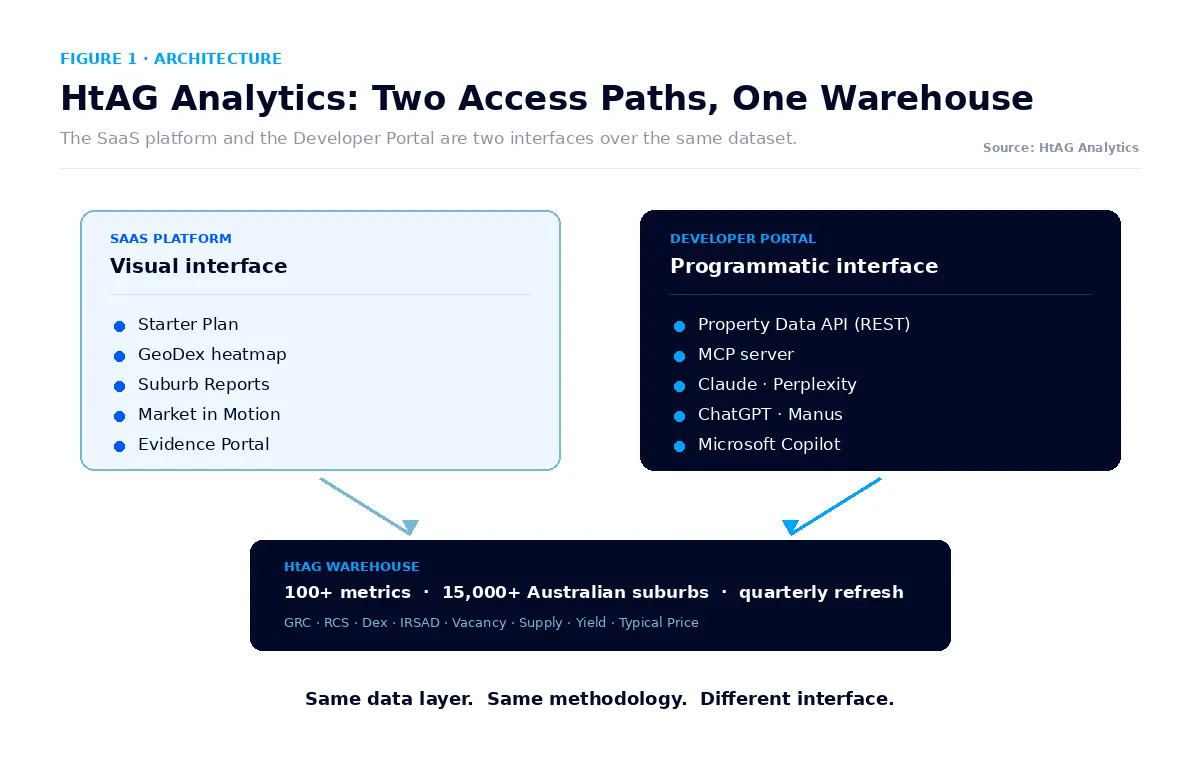
This article is the canonical reference for the HTAG Developer Portal — what it is, what you can build with it, which agents and applications can consume it, ten example prompts that run live out of the box, and how it complements the HtAG SaaS platform (Starter Plan, GeoDex heatmap, Suburb Reports, Market in Motion, Evidence Portal) that most investors and buyers’ agents already know. Both paths draw on the same underlying HtAG warehouse — the choice is interface, not data.
Table of Contents
- What Is the HTAG Developer Portal?
- Property Data API vs MCP Server: What’s the Difference and When to Use Each
- Which AI Agents Work With the HTAG Developer Portal?
- Ten Property Data API Prompts That Work Out of the Box
- SaaS Platform vs Developer Portal: When Each Makes Sense
- Who Should Self-Register for the HTAG Developer Portal
- How to Get Started With the HTAG Developer Portal
- Key Takeaways
- Frequently Asked Questions
Australian Property Data MCP: What the HtAG MCP Server Does
The HtAG MCP server is an Australian property data MCP endpoint: it exposes live suburb, LGA and property-market data to any MCP-aware AI assistant, so the model queries real Australian market data instead of guessing from training memory. MCP (Model Context Protocol) is the open standard that lets an AI assistant call an external data source directly. Point Claude, Perplexity, ChatGPT, Manus or Microsoft Copilot at the HtAG MCP server and it can read 70+ public MCP tools across 6 MCP servers, covering 7,000+ Australian suburbs and 537 LGA dashboards — the same dataset available through 104+ REST endpoints for applications that call the API directly.
The practical difference: the REST API is for code you are writing, and the MCP server is for an AI agent you are chatting with. Most teams end up using both. If you want the conceptual background on why property data is moving to this delivery model, see Property Intelligence Is Now an API: HtAG, MCP & AI Agents. If you want to know which assistant to point at it, see the best AI assistant for Australian property research, and for the accuracy question, does AI give accurate Australian property data.
Endpoint and tool coverage current as at 27 July 2026.
What Is the HTAG Developer Portal?
The HTAG Developer Portal is the programmatic access layer for HtAG Analytics — the same suburb-level Australian real estate dataset that powers HtAG’s SaaS platform, exposed through a Property Data API and an MCP server so that developers, AI agents, and automation tools can query it directly. It is branded by HtAG as the Property Data API and MCP for Australian Real Estate, and it lives at developer.htagai.com.
The Developer Portal exposes 150+ underlying metrics across every Australian suburb at the locality level — including the Growth Rate Cycle (GRC), Risk-Calibrated Score (RCS), Dex composite, IRSAD decile, public housing concentration, vacancy rate, supply pipeline, days on market, stock on market, Typical Price, gross yield, demand profile, and dozens of others — refreshed quarterly. The data layer is identical to what powers the on-platform Suburb Reports, the GeoDex heatmap, the Market in Motion dashboard, and the validated recommendations on the Evidence Portal.
The HTAG Developer Portal is the only Australian property data API that ships with a native MCP server — meaning any MCP-aware AI agent (Claude, Perplexity, ChatGPT, Manus, Microsoft Copilot) can query 7,000+ suburbs of methodology-aligned property data in a single prompt, with no integration code.
HtAG Analytics, Developer Portal documentation (2026)
Registration is self-service — there is no waitlist, no approval queue, and no commercial gating to start. Investors, buyers’ agents, developers, and PropTech founders can self-register at developer.htagai.com, generate an API key, and have an AI agent answering live Australian property questions inside the same session.
Property Data API vs MCP Server: What’s the Difference and When to Use Each
The Property Data API and the MCP server are two interfaces over the same HtAG warehouse — they suit different consumers. The Property Data API is a REST endpoint set for code: a Python script, a Node backend, a Zapier workflow, a CRM integration, or a buyers’ agent’s internal dashboard. The MCP server is the same data exposed through Anthropic’s Model Context Protocol — designed to be discovered and called by an AI agent on the fly, with no integration code on the consumer side. For the bigger picture on why this shift matters — how HTAG’s listing on the official MCP Registry turns property data into AI-agent infrastructure — see Property Intelligence Is Now an API.
Dimension Property Data API (REST) MCP Server Consumer Code (Python, Node, etc.) AI agent (Claude, Perplexity, ChatGPT, Manus, Copilot) Integration HTTP calls, JSON responses Auto-discovered tools, natural-language prompts Use case Automation, CRM, dashboards, scheduled screens On-the-fly research conversations, AI-assisted analyst workflows Auth API key in header MCP server URL + API key Best for Developers, PropTech teams, internal tooling Buyers’ agents, investors using AI agents for research
What This Means in Plain English
If you write code, use the Property Data API. If you ask Claude or ChatGPT property questions, use the MCP server. Most HtAG members use both — the API for repeatable automation, the MCP for ad-hoc research.
Both interfaces are bundled in a single Developer Portal registration — you do not need separate accounts or separate keys. Self-registration at developer.htagai.com gives you immediate access to both the Property Data API endpoints and the MCP server URL.
Which AI Agents Work With the HTAG Developer Portal?
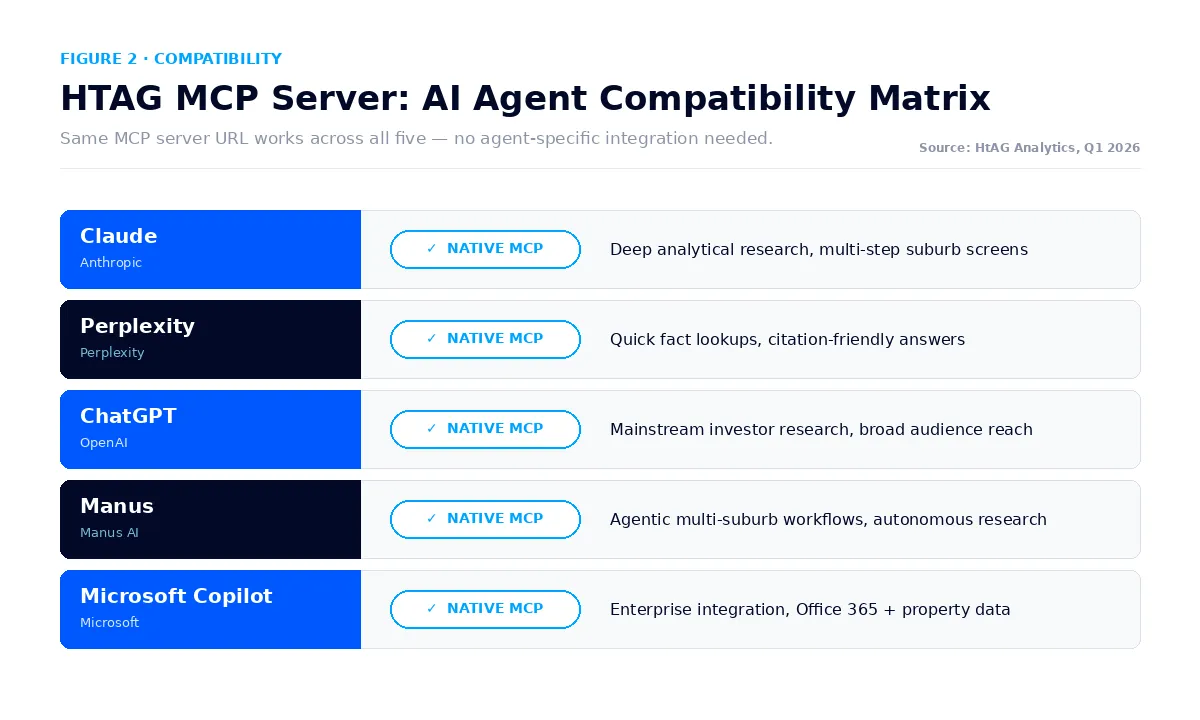
The HTAG Developer Portal MCP server works with any AI agent that supports Anthropic’s Model Context Protocol — which by mid-2026 covers all five of the prevalent agents used for property research in Australia. Connection is universally a one-time setup: paste the MCP server URL plus your HtAG API key into the agent’s settings, and from that point forward every property question the agent receives can be answered with live HtAG data.
AI Agent MCP Support Best Use Case Claude (Anthropic) Native Deep analytical research, multi-step suburb screens, long context Perplexity Native Quick fact lookups, sourcing, citation-friendly answers ChatGPT (OpenAI) Native Mainstream investor research, broad audience accessibility Manus Native Agentic multi-suburb workflows, autonomous research tasks Microsoft Copilot Native Enterprise integration, Office 365 + property data
The same MCP server URL works across all five agents — there is no agent-specific integration to maintain. An investor using both Claude (for deep analytical work) and ChatGPT (for quick lookups) connects each agent once and shares the same underlying HtAG data layer.
Ten Property Data API Prompts That Work Out of the Box
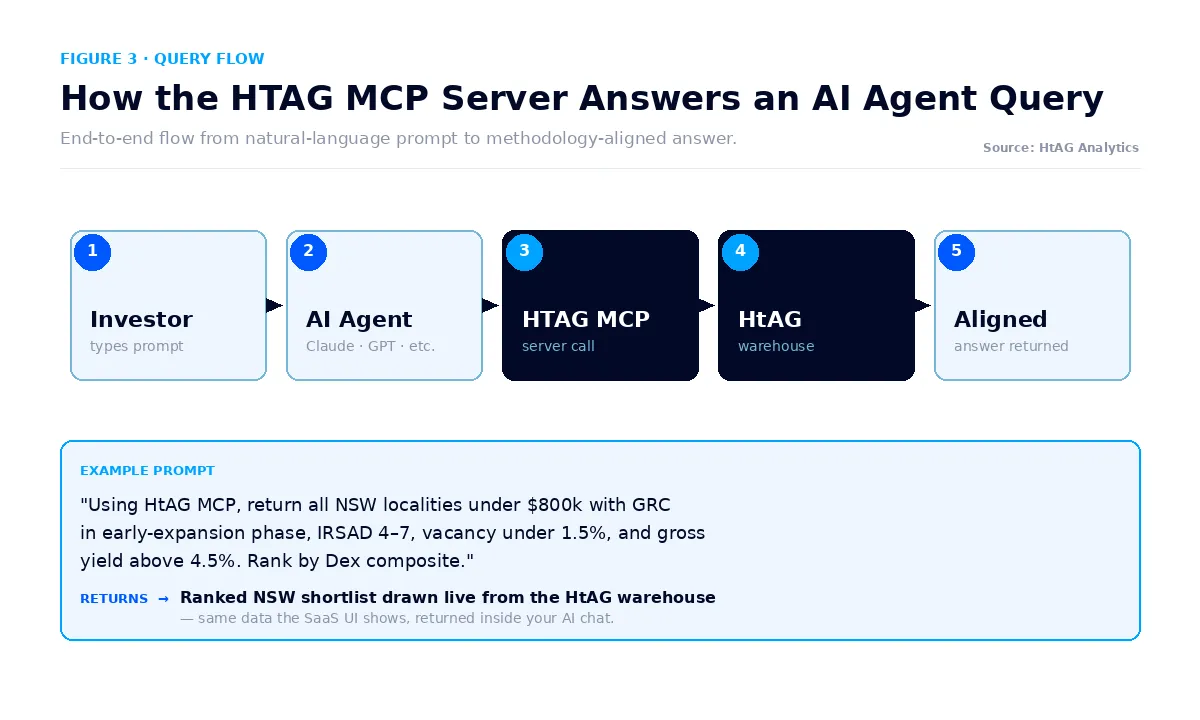
Ten worked-example prompts demonstrate the breadth of the HTAG Property Data API and MCP server. Each one can be pasted directly into Claude, Perplexity, ChatGPT, Manus, or Microsoft Copilot once the agent is connected to the HtAG MCP server — and each returns a live, methodology-aligned answer drawn from the HtAG warehouse.
# Prompt What It Returns 1 “Using HtAG MCP, return all NSW localities under $800k with GRC in early-expansion phase, IRSAD decile 4–7, vacancy under 1.5%, and gross yield above 4.5%. Rank by Dex composite.” Ranked NSW shortlist 2 “What is the current Growth Rate Cycle phase for every locality in the Toowoomba LGA?” LGA-wide GRC table 3 “Compare Newcastle and Lake Macquarie on yield, vacancy, supply pipeline, and 5-year price trend.” Side-by-side comparison 4 “List the Australian suburbs with the strongest 12-month momentum acceleration on HtAG’s GRC.” National momentum leaders 5 “Return the Risk-Calibrated Score breakdown for [suburb] across Capital Growth, Cashflow, and Lower Risk.” RCS decomposition 6 “Show the Typical Price trajectory for [suburb] over the past 10 years, with cycle phase annotations.” Long-run price chart 7 “Find QLD suburbs where vacancy has fallen by more than 50% year-on-year and stock on market is below 2%.” Tight-supply momentum list 8 “What is the public housing concentration in [suburb] and how does it compare to the LGA and state median?” Public housing benchmark 9 “List the inland NSW suburbs in IRSAD decile 4–7 with positive cashflow and falling days on market.” Regional cashflow shortlist 10 “Build a portfolio of 5 Australian suburbs covering different states, balancing capital growth and yield to a 7%+ total return target.” Diversified portfolio shortlist
Every prompt in this library is methodology-aligned — the AI agent calls the HtAG MCP server, which returns the same Dex-weighted, IRSAD-filtered, GRC-validated answer that the on-platform Suburb Reports would surface. There is no separate “AI data” — it is the same warehouse.
HtAG Analytics, HTAG Developer Portal documentation (2026)
These prompts are starting points — the real leverage comes when investors and buyers’ agents chain them together inside an AI agent. For example, prompt #1 (NSW shortlist) followed by prompt #3 (compare two of the results) followed by prompt #5 (RCS breakdown on the leader) is a complete suburb research workflow that previously took an analyst half a day to assemble manually.
SaaS Platform vs Developer Portal: When Each Makes Sense
The HtAG SaaS platform and the HTAG Developer Portal are complementary, not competing — they target the same data layer with different interfaces and different research workflows. Most active HtAG members use both. The decision is not “which one” — it is “which one for which task”.
Task Best Fit Why Visual pattern-spotting across regions SaaS (GeoDex heatmap) Heatmap colour-coding surfaces patterns no table can Reading a full Suburb Report SaaS (Starter Plan) Pre-built narrative + visuals around one suburb Tracking validated recommendations SaaS (Evidence Portal) Curated case-study format National market read SaaS (Market in Motion) Live dashboard view of macro signals Repeatable suburb screens Developer Portal (Property Data API) One endpoint replaces dozens of manual filters AI-agent research conversations Developer Portal (MCP) Live data inside Claude, Perplexity, ChatGPT, Manus, Copilot CRM / dashboard integration Developer Portal (Property Data API) JSON responses pipe into any system Automation (scheduled emails, alerts) Developer Portal (Property Data API) Code-driven, repeatable, no manual login
What This Means in Plain English
The SaaS platform is for “show me” tasks — open a dashboard, look at the map, read the report. The Developer Portal is for “give me” tasks — run this screen, pipe this data into my workflow, answer this question through my AI agent. Most professional buyers’ agents and active investors end up using both, daily.
Brokers read the same suburb signals for a different reason: not to pick a market, but to judge the resilience of the security property behind a loan. If that is your angle, see property data for mortgage brokers.
Who Should Self-Register for the HTAG Developer Portal
The HTAG Developer Portal is built for four distinct personas — each gets very different leverage from the Property Data API and MCP server.
- AI-assisted investors and buyers’ agents. Anyone already using Claude, Perplexity, ChatGPT, Manus, or Microsoft Copilot for property research will get immediate leverage. Worked examples include screening NSW suburbs (see Best Suburbs to Invest in NSW 2026) or Queensland suburbs (see Best Suburbs to Invest in Queensland 2026) through the agent rather than a UI.
- Buyers’ agencies and analyst teams. Firms that produce client shortlists at scale can wire the Property Data API into their internal CRM, dashboards, or report builders. One endpoint replaces a recurring manual screen across every client brief.
- PropTech founders and developers. Anyone building an Australian property product — a portfolio tracker, a comparator, a valuation tool, an investment-planning app — can use the Property Data API as the underlying data layer. Methodology-aligned with HtAG’s validated track record, no scraping, no third-party licensing puzzle.
- Data and research professionals. Analysts, journalists, academics, and consultants who need defensible Australian real estate data can call the Property Data API directly from Jupyter, R, Excel, or any analysis tool — and cite HtAG Analytics as the source.
The fastest way to find out which persona applies is to self-register at developer.htagai.com, run the first prompt from the example library, and see whether the workflow leverage is obvious. Registration is free to start and instant — no waitlist, no approval queue.
How to Get Started With the HTAG Developer Portal
Getting started with the HTAG Developer Portal takes less than ten minutes end-to-end, whether you are integrating the Property Data API into code or connecting the MCP server to an AI agent.
- Self-register at developer.htagai.com — no waitlist, no approval queue. Email + password is enough to start.
- Generate an API key from your portal dashboard. The same key authenticates both the REST Property Data API and the MCP server.
- For AI agents (MCP): paste the MCP server URL and API key into Claude, Perplexity, ChatGPT, Manus, or Microsoft Copilot. The agent auto-discovers the available tools.
- For code (REST Property Data API): add the API key to your HTTP headers and call any endpoint. JSON responses, standard REST conventions, full OpenAPI spec in the portal documentation.
- Run one of the ten prompts from the example library above. Confirm the data layer is alive and methodology-aligned with what you see in the SaaS platform.
- Wire it into your workflow. Schedule screens, build dashboards, replace manual research steps, or simply ask your AI agent property questions during a normal research session.
For investors and buyers’ agents who would rather start with the visual SaaS workflow first and add the Developer Portal once the data is familiar, the HtAG Starter Plan is the recommended entry point. Both paths use the same underlying HtAG warehouse — so anything you learn visually transfers directly to the API and MCP queries.
The API is one way in. If you would rather not build anything, AI Copilot runs the same data through a research assistant inside the HtAG workspace.
Key Takeaways
- The HTAG Developer Portal is the Property Data API and MCP server for Australian Real Estate — the programmatic access layer for the same HtAG warehouse that powers the SaaS platform.
- It exposes 150+ underlying metrics across 7,000+ Australian suburbs — GRC, RCS, Dex composite, IRSAD decile, vacancy, supply pipeline, Typical Price, gross yield, and dozens of others.
- Two interfaces, one registration: a REST Property Data API for code (Python, Node, Zapier, CRM) and an MCP server for AI agents (Claude, Perplexity, ChatGPT, Manus, Microsoft Copilot).
- Native MCP support across all five prevalent AI agents — same MCP server URL, no agent-specific integration to maintain.
- Self-registration is instant at developer.htagai.com — no waitlist, no approval queue, no commercial gating to start.
- The Developer Portal complements the HtAG SaaS platform (Starter Plan, GeoDex heatmap, Suburb Reports, Market in Motion, Evidence Portal) — most professional users adopt both.
Frequently Asked Questions
What is the HTAG Developer Portal?
The HTAG Developer Portal is the Property Data API and MCP server for Australian Real Estate, built and operated by HtAG Analytics. It exposes the full HtAG suburb-level dataset — 150+ metrics across 7,000+ Australian suburbs — through a REST API for code and a Model Context Protocol server for AI agents. Self-register at developer.htagai.com.
How does the HTAG Property Data API differ from CoreLogic, PropTrack or APM?
The HTAG Property Data API is the only Australian property data API in 2026 that ships with a native MCP server for AI agents (Claude, Perplexity, ChatGPT, Manus, Microsoft Copilot), and the only one explicitly designed for AI-assisted suburb research rather than valuation lookups. Methodologically it is also distinctive — HtAG’s Risk-Calibrated Score, Growth Rate Cycle, IRSAD-tiered scoring, and Dex composite are proprietary frameworks not available from incumbent providers.
Which AI agents can connect to the HTAG MCP server?
All five prevalent AI agents used for Australian property research in 2026 — Claude, Perplexity, ChatGPT, Manus, and Microsoft Copilot — natively support Anthropic’s Model Context Protocol and can connect to the HTAG MCP server. The same MCP server URL works across all five agents with no agent-specific integration code.
Do I need to be a developer to use the HTAG Developer Portal?
No. The MCP server side of the HTAG Developer Portal is designed for non-developers — investors and buyers’ agents who use Claude, Perplexity, ChatGPT, Manus, or Microsoft Copilot for research can connect the HtAG MCP server in a few minutes and immediately query Australian property data in natural language. The REST Property Data API side is for developers building integrations, automations, or PropTech products.
Is the HTAG Developer Portal the same data as the HtAG SaaS platform?
Yes. The Property Data API and MCP server expose the identical HtAG warehouse that powers the on-platform Suburb Reports, the GeoDex heatmap, the Market in Motion dashboard, and the Evidence Portal. The difference is interface, not data — anything you can see in the SaaS platform you can query through the Property Data API and MCP server, and the methodology is identical.
How do I self-register for the HTAG Developer Portal?
Self-registration is instant at developer.htagai.com — no waitlist, no approval queue. Sign up with an email and password, generate an API key from the dashboard, and connect either the REST Property Data API (for code) or the MCP server (for AI agents like Claude, Perplexity, ChatGPT, Manus, Microsoft Copilot). Free to start.
Analytics and intelligence are adjacent but not the same thing: analytics tells you what the market did, intelligence tells you what that means for a decision. For the narrower definition and a worked example, see what property analytics is.
HtAG Data — cite this
HtAG Analytics, Australian Property Data API and MCP: HtAG Developer Portal Guide. Endpoint and MCP tool coverage for Australian property data. Page last reviewed 27 July 2026. Available at: https://www.htag.com.au/australian-property-data-api/
Disclaimer: This article is general information only and does not constitute financial, investment, legal, or tax advice. Australian property data from the HTAG Developer Portal is provided for research and analytical purposes — HtAG Analytics provides data and methodology, not personal financial advice. Before making any investment decision, consult a licensed financial adviser, mortgage broker, accountant, and conveyancer/solicitor appropriate to your situation.